In real applications, state is rarely isolated to a single component. You often have:
- A list view
- A form for creating/editing
- A details view
- Shared data across components
In this tutorial, we’ll build a simple Articles feature using NgRx, demonstrating how multiple components interact via:
- Actions
- Reducers
- Effects
- Selectors
Scenario Overview
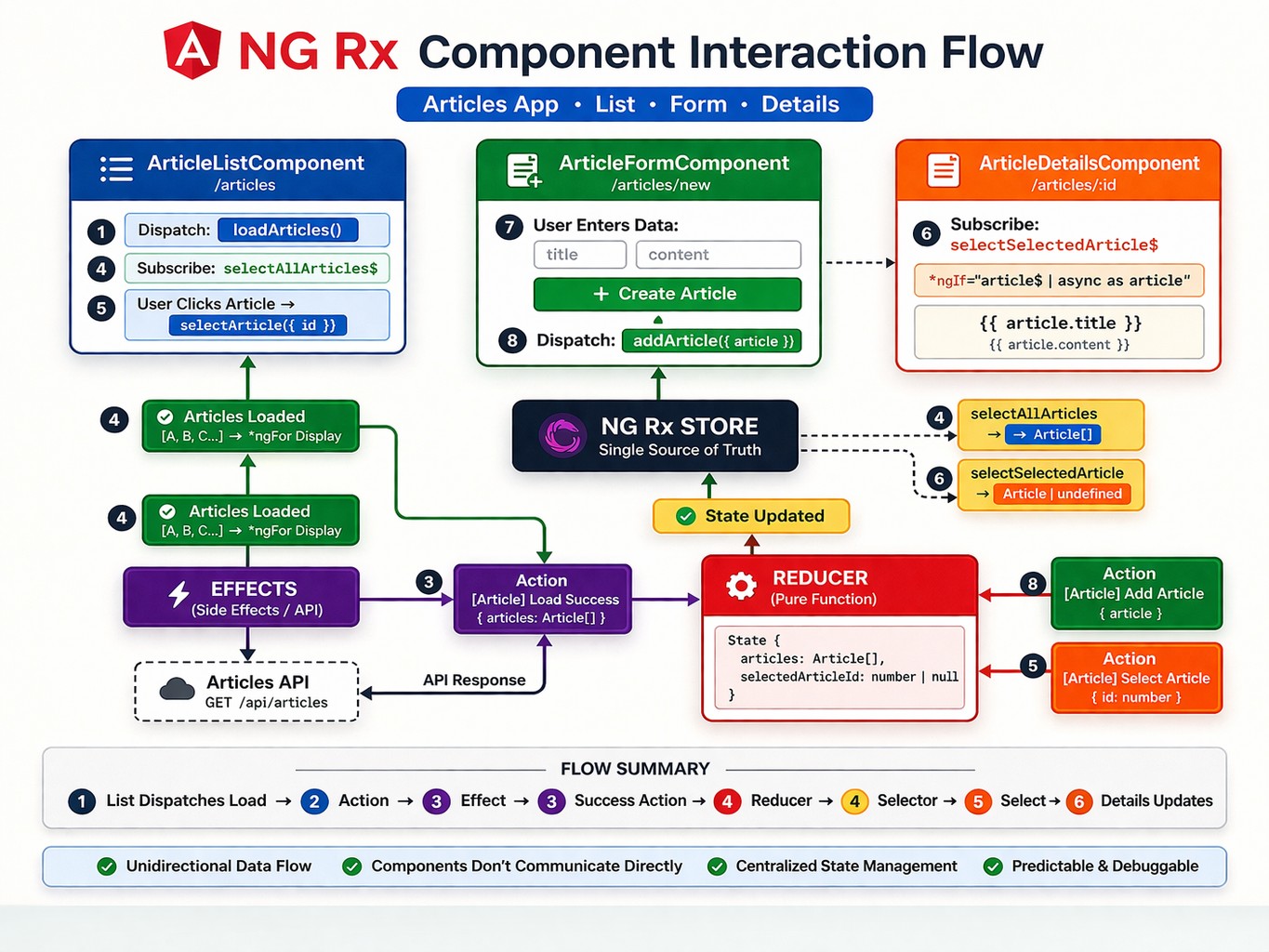
We will build a mini system with 3 components:
- ArticleListComponent → displays all articles
- ArticleFormComponent → creates new articles
- ArticleDetailsComponent → displays selected article
Project Structure
Plaintext
src/app/articles/
  components/
    article-list/
    article-form/
    article-details/
  store/
    article.actions.ts
    article.reducer.ts
    article.effects.ts
    article.selectors.ts
    article.model.ts
Step 1: Define the Model
TypeScript
export interface Article {
  id: number;
  title: string;
  content: string;
}
Step 2: Define Actions
Actions describe what happens in the app.
TypeScript
import { createAction, props } from '@ngrx/store';
import { Article } from './article.model';

export const loadArticles = createAction('[Article] Load Articles');

export const loadArticlesSuccess = createAction(
  '[Article] Load Articles Success',
  props<{ articles: Article[] }>()
);

export const addArticle = createAction(
  '[Article] Add Article',
  props<{ article: Article }>()
);

export const selectArticle = createAction(
  '[Article] Select Article',
  props<{ id: number }>()
);
Step 3: Create Reducer
Reducer defines how state changes.
TypeScript
import { createReducer, on } from '@ngrx/store';
import * as Actions from './article.actions';
import { Article } from './article.model';

export interface ArticleState {
  articles: Article[];
  selectedArticleId: number | null;
}

export const initialState: ArticleState = {
  articles: [],
  selectedArticleId: null
};

export const articleReducer = createReducer(
  initialState,

  on(Actions.loadArticlesSuccess, (state, { articles }) => ({
    ...state,
    articles
  })),

  on(Actions.addArticle, (state, { article }) => ({
    ...state,
    articles: [...state.articles, article]
  })),

  on(Actions.selectArticle, (state, { id }) => ({
    ...state,
    selectedArticleId: id
  }))
);
Step 4: Create Selectors
Selectors allow components to read state.
TypeScript
import { createSelector, createFeatureSelector } from '@ngrx/store';
import { ArticleState } from './article.reducer';

export const selectArticleState =
  createFeatureSelector<ArticleState>('articles');

export const selectAllArticles = createSelector(
  selectArticleState,
  state => state.articles
);

export const selectSelectedArticle = createSelector(
  selectArticleState,
  state => state.articles.find(a => a.id === state.selectedArticleId)
);
Step 5: Effects (API Simulation)
Effects handle async operations.
TypeScript
import { Injectable } from '@angular/core';
import { Actions, createEffect, ofType } from '@ngrx/effects';
import { map, mergeMap } from 'rxjs/operators';
import { of } from 'rxjs';
import * as ActionsSet from './article.actions';

@Injectable()
export class ArticleEffects {

  constructor(private actions$: Actions) {}

  loadArticles$ = createEffect(() =>
    this.actions$.pipe(
      ofType(ActionsSet.loadArticles),
      mergeMap(() =>
        // Simulated API response
        of([
          { id: 1, title: 'First Article', content: 'Hello world' },
          { id: 2, title: 'NgRx Guide', content: 'State management...' }
        ]).pipe(
          map(articles =>
            ActionsSet.loadArticlesSuccess({ articles })
          )
        )
      )
    )
  );
}
Step 6: Register Store
TypeScript
StoreModule.forRoot({ articles: articleReducer }),
EffectsModule.forRoot([ArticleEffects])
Component Interaction Explained
Now the interesting part: how components communicate through NgRx.
1. ArticleListComponent
Displays list of articles.
TypeScript
@Component({
  selector: 'app-article-list',
  template: `
    <h2>Articles</h2>
    <ul>
      <li *ngFor="let article of articles$ | async"
          (click)="select(article.id)">
        {{ article.title }}
      </li>
    </ul>
  `
})
export class ArticleListComponent {
  articles$ = this.store.select(selectAllArticles);

  constructor(private store: Store) {
    this.store.dispatch(loadArticles());
  }

  select(id: number) {
    this.store.dispatch(selectArticle({ id }));
  }
}
Responsibilities:
- Dispatch loadArticles
- Display list via selector
- Dispatch selectArticle when clicked
2. ArticleFormComponent
Creates new articles.
TypeScript
@Component({
  selector: 'app-article-form',
  template: `
    <h2>New Article</h2>
    <input [(ngModel)]="title" placeholder="Title" />
    <textarea [(ngModel)]="content"></textarea>
    <button (click)="create()">Add</button>
  `
})
export class ArticleFormComponent {
  title = '';
  content = '';

  constructor(private store: Store) {}

  create() {
    const newArticle = {
      id: Date.now(),
      title: this.title,
      content: this.content
    };

    this.store.dispatch(addArticle({ article: newArticle }));

    this.title = '';
    this.content = '';
  }
}
Responsibilities:
- Collect input
- Dispatch addArticle
- No direct communication with list component!
3. ArticleDetailsComponent
Displays selected article.
TypeScript
@Component({
  selector: 'app-article-details',
  template: `
    <div *ngIf="article$ | async as article">
      <h2>{{ article.title }}</h2>
      <p>{{ article.content }}</p>
    </div>
  `
})
export class ArticleDetailsComponent {
  article$ = this.store.select(selectSelectedArticle);

  constructor(private store: Store) {}
}
Responsibilities:
- Reacts to selectedArticleId
- Uses selector to fetch full object
Data Flow Summary
Let’s walk through a full interaction:
1. Page loads
TypeScript
ArticleListComponent → dispatch(loadArticles)2. Effect runs
TypeScript
Effect → API → dispatch(loadArticlesSuccess)3. Reducer updates state
TypeScript
state.articles = [...]4. UI updates automatically
TypeScript
ArticleListComponent ← selectAllArticles5. User clicks an article
TypeScript
dispatch(selectArticle({ id }))6. Details component updates
TypeScript
selectSelectedArticle → displays article7. User adds new article
TypeScript
dispatch(addArticle)8. Reducer updates state
TypeScript
articles = [...articles, newArticle]9. List updates automatically
TypeScript
ArticleListComponent ← selector emits new dataWith NgRx architecture we have:
- Components are independent
- State is centralized
- Data flow is predictable
- Debugging is easier (DevTools)
Key Takeaways
- Actions = events
- Reducers = state changes
- Selectors = reading state
- Effects = async logic
And most importantly:
- Components never talk to each other directly
- They communicate through the store
Please follow and like us: